

Playground
The Playground is a private chat where you can try a bot before visitors use it. It uses the bot’s current knowledge selection and global instructions, so it’s the quickest way to check a change.
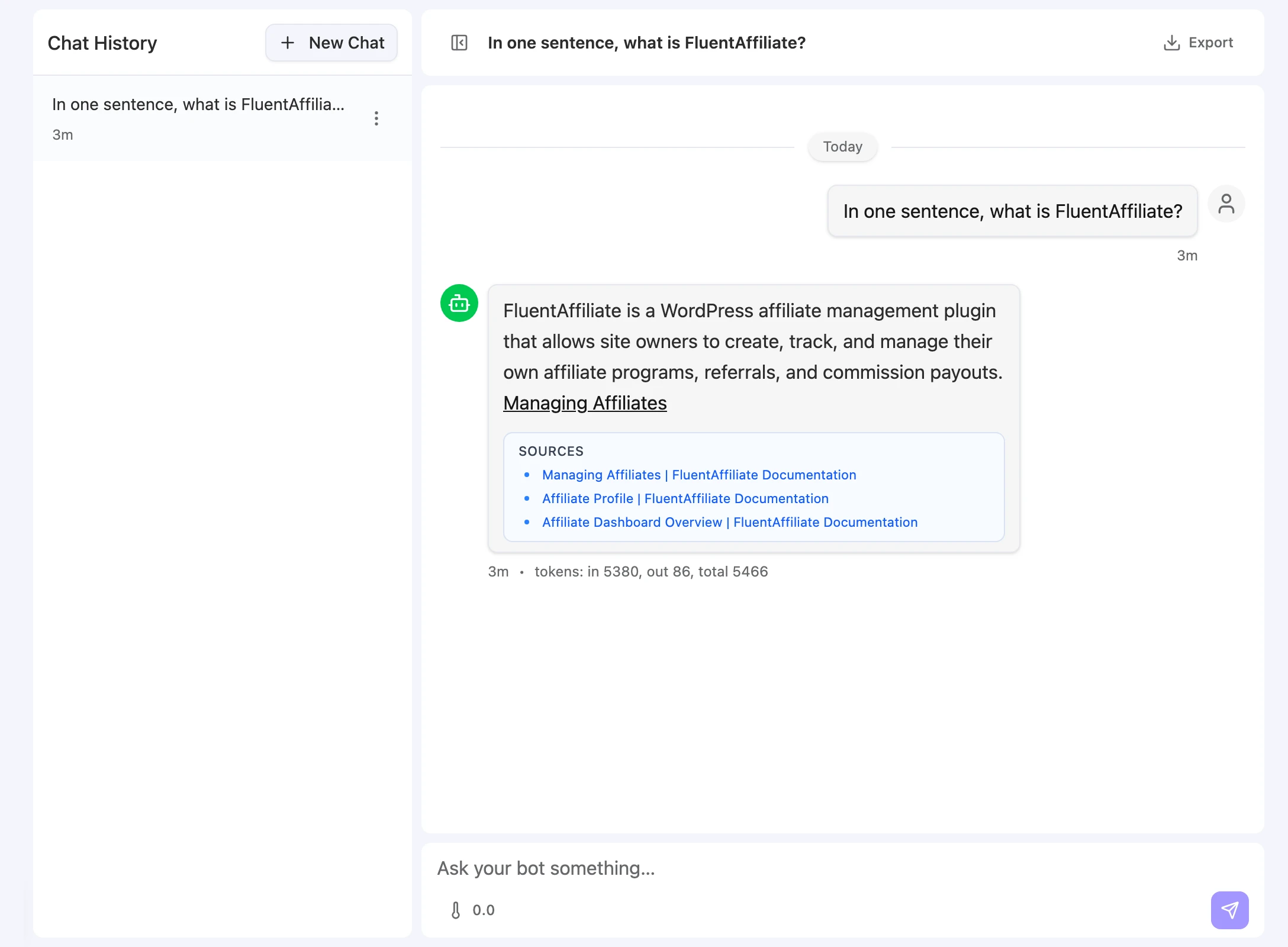
Open a bot and click Playground in its sidebar. The page has a Chat History list on the left and the open chat on the right.
Test a question
-
Start a chat. Click New Chat.
-
Ask something real. Type into Ask your bot something… and press Enter.
-
Read the reply. Check the answer and the links to the sources it used.
Follow-up questions in the same chat keep the earlier turns as context. Click New Chat to start fresh.
What each reply shows
| Element | What it shows |
|---|---|
| Answer | The bot’s reply, with inline links to the sources it drew from. |
| Sources | The documents used for the answer. Click one to open it. |
| Time | How long ago the message was sent. |
| Tokens | tokens: in …, out …, total … for that reply. |
Adjust the temperature
The thermometer control under the message box sets the sampling temperature for your Playground messages, from 0.0 to 2.0. Lower values give more consistent answers; higher values give more varied wording. It doesn’t change the bot’s settings for other channels.
Manage test chats
- Reopen a chat: click it in Chat History and keep asking.
- Delete chats: open a chat’s Conversation actions menu and choose Delete, or choose Select to pick several chats and delete them together. Deleted chats can’t be restored.
- Export a chat: with a chat open, click Export and choose CSV or JSON.
Before you rely on the Playground
- The Playground uses global instructions. A channel with Use global instructions turned off answers with its own instructions instead. To test a channel exactly as visitors see it, open the channel and use Chat as user or Preview. See Channels.
- The Playground can use every enabled action. Channel permissions don’t apply here, so an action that works in the Playground may still be turned off for a channel. Actions that need a website page, such as client-side code or forms, only run on a website channel, and FluentCart doesn’t run here at all; use the action editor’s Preview for those. See Actions.
- Playground chats count as usage. Their messages appear in the bot’s Total Messages, and their tokens count toward your team’s usage.
Troubleshooting
The answer has no Sources
Possible cause: The bot has no sources selected, its sources aren’t Indexed, or they don’t cover the question.
Solution: Open Knowledge to check the selection and status, then add or refresh content.
The answer cites a source but is still wrong
Possible cause: The document content is outdated or unclear, or the answer cache returned an older answer.
Solution: Refresh the source in the Knowledge Base, then click Purge cache in Bot settings and ask again.